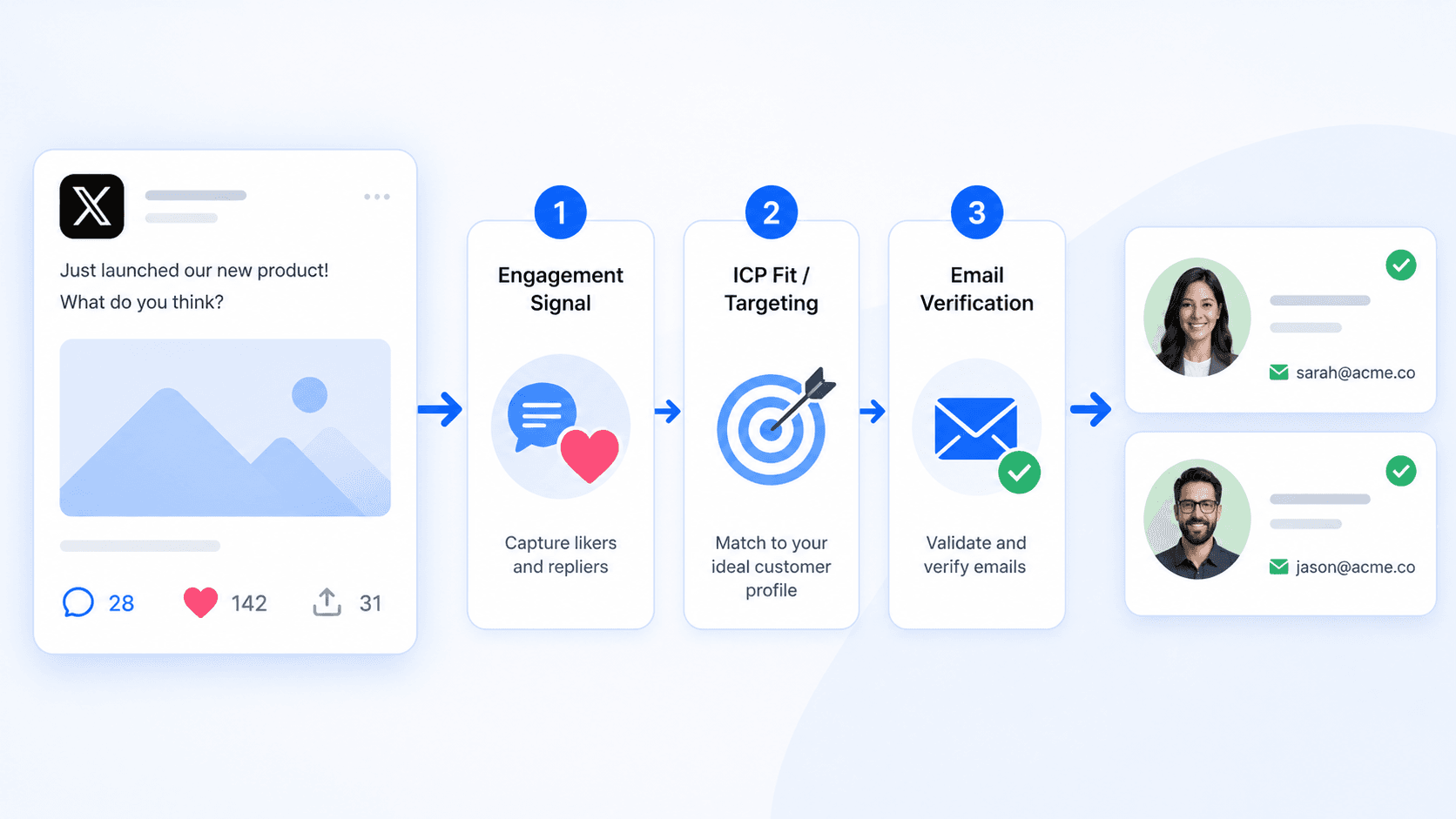
How to Scrape Emails from Twitter/X Followers & Keyword Searches (2026)
Learn how to scrape emails from Twitter/X followers, keyword searches and tweet engagement to build clean, verified B2B email lists for cold email.


On this page (7 sections)
Knowing how to scrape emails from Twitter/X is one of the fastest ways to turn Twitter into a predictable B2B lead generation channel. Twitter (now X) is where founders, marketers, sales teams and creators openly share pain points, tools and buying decisions — but that valuable contact data is scattered across profiles, websites and tweets.
The real challenge is not just “how to scrape emails from Twitter”, but how to turn twitter data into clean, valid email addresses you can safely use for cold email and Twitter outreach without wrecking deliverability. In this guide, you will see exactly how to scrape emails from Twitter followers, Twitter search results and tweet engagement, how to extract emails at scale from public Twitter profiles, and how to keep email quality high enough that your campaigns actually convert into quality leads and a stronger sales pipeline.
What Is Twitter/X Email Scraping in 2026?
In 2026, twitter email scraping means using a twitter scraper to perform structured data extraction on public twitter profiles, tweets and linked websites in order to build contact lists. It is not about hacking accounts or guessing company email formats; it is about collecting data that Twitter users intentionally expose on their profiles and websites.
Typical sources of publicly available email addresses on Twitter/X include:
-
Business emails or personal emails written directly in the bio, such as “contact: founder[at]company.com”.
-
Contact details published on websites linked from public Twitter profiles (company sites, personal blogs, Linktree pages).
-
Emails shared in pinned tweets, intro threads or tweet replies where users invite collaboration or influencer marketing deals.
A proper twitter email scraper tool focuses only on publicly available data and turns it into extracted data you can push into your CRM or outreach tools. Done right, scraping Twitter data allows you to:
-
Find leads across a specific niche or industry.
-
Build lookalike audience segments based on a competitor’s audience.
-
Support outbound sales, partnerships and influencer marketing without relying only on other platforms like LinkedIn.
The rest of this article breaks down step by step how to scrape emails from Twitter followers, keyword & hashtag searches, and tweet engagement — and how to keep everything legal, safe and effective.
How to Scrape Emails from Twitter/X Followers
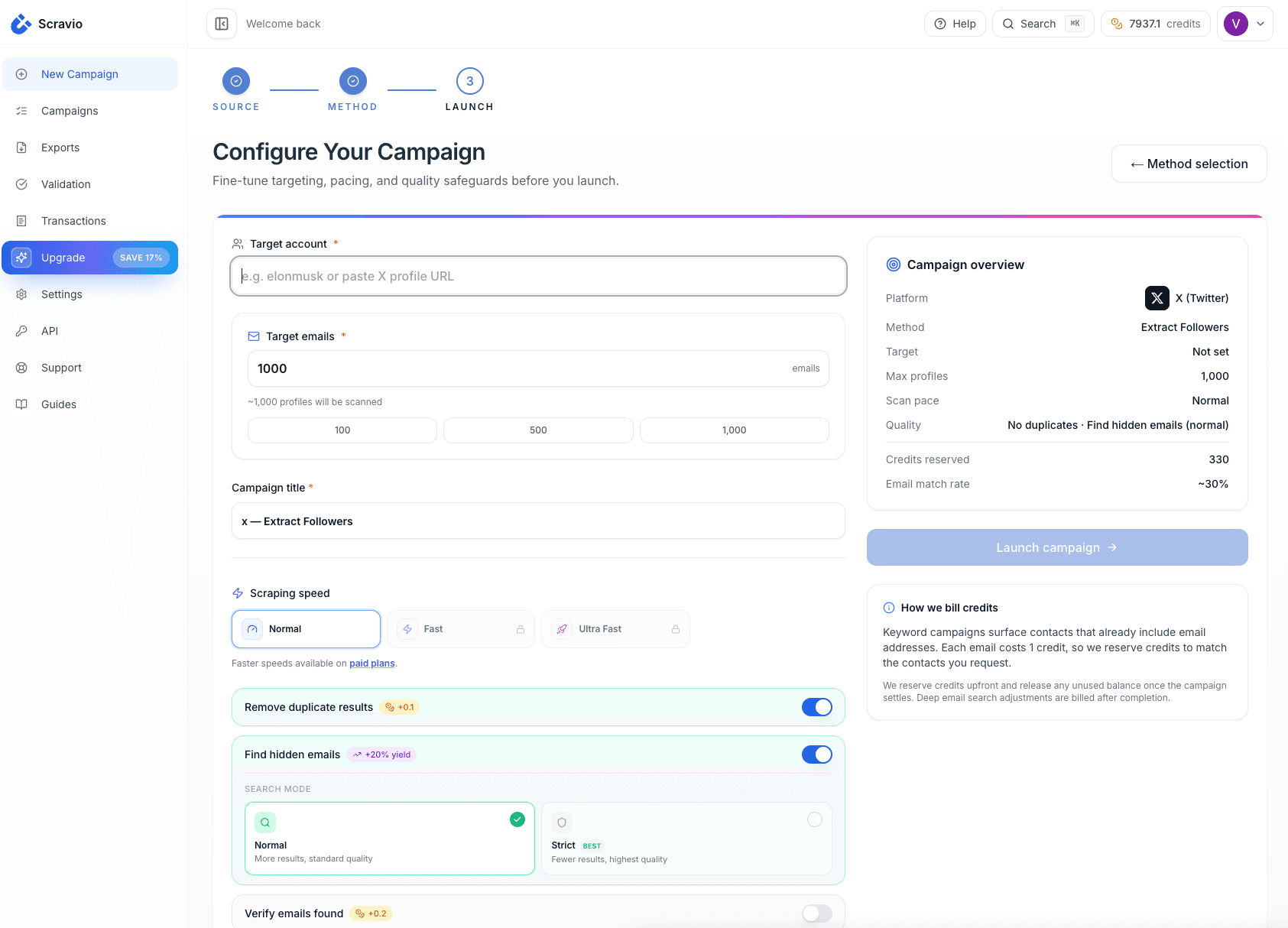
For most people, the first use case is to scrape emails from Twitter followers – your own, your competitors’ and those of niche influencers.
Find the Right Twitter/X Accounts First
Choosing the right twitter accounts to scrape is more important than scraping unlimited emails from random profiles. If the account’s audience does not match your ICP, your extracted data will be noisy and your outreach efforts will underperform.
Think about who you want to target:
-
SaaS founders, agency owners and B2B marketers.
-
SDR teams and sales leaders running outbound.
-
Creators and KOLs in a specific niche.
Three types of accounts are ideal to start with:
-
Your own account: scraping emails from Twitter followers who already know you is the lowest‑friction entry point.
-
Competitors’ accounts: scraping Twitter data from a competitor’s audience helps you understand their positioning and build a lookalike audience based on their followers.
-
Niche influencers: Twitter users who regularly post about your topic and attract your target users based on role, industry or problem.
A quick bio scan will tell you if a profile’s audience is promising. If a bio says “Helping B2B SaaS founders with cold email & lead generation”, scraping emails from those followers is far more likely to produce quality leads for a cold email product than followers of a generic meme account.
Extract Emails from Follower Profiles and Bio Links
Once you’ve selected the right accounts, you can start to extract emails from their follower lists.
At a small scale you can:
-
Open follower lists and inspect user profiles one by one.
-
Collect data points: twitter username, display name, bio, profile data, website URL, location.
-
Look for email patterns in the bio:
-
Standard emails:
[email protected]. -
Obfuscated emails: name [at] domain [dot] com.
-
-
Click through to linked websites and collect data from Contact, About, Legal or Footer pages where business emails usually live.
However, if you want to scrape emails from Twitter at volume, manual work quickly breaks down. This is where a twitter scraper or dedicated twitter email scraper becomes a powerful tool:
-
With just a few clicks, you can feed in one or multiple accounts and let the tool automate the data extraction process.
-
The tool focuses on public Twitter profiles and linked URLs, then returns extracted data such as handle, bio, contact details and emails in a CSV file you can import into other tools.
At this stage, your job is to ensure the tool automates the boring work but keeps you in control of what data from Twitter you actually keep and use.
Clean and Verify Follower Emails Before Outreach
Raw emails from Twitter followers are never perfect. Before you use those emails from Twitter for cold email:
-
Remove duplicates and consolidate profiles that share the same email.
-
Drop obvious non‑business emails when you need B2B (for example, generic personal emails with no link to your ICP).
-
Filter out profiles that clearly sit outside your specific niche or target segment.
Then, validate and categorize:
-
Run all scraped twitter emails through an email scraper’s verification module or a separate verifier to ensure you are left with valid email addresses only.
-
Check for emails verified as valid, and mark invalid or risky records so they never reach your ESP.
-
Tag each record with its source (“follower of @yourbrand”, “follower of @competitor”) so you can later measure which segments produce the highest email quality and response rates.
Only once you have a clean base of verified emails from followers does it make sense to expand your data collection into keyword and hashtag search or tweet engagement.
How to Scrape Emails from Twitter/X Keyword & Hashtag Searches
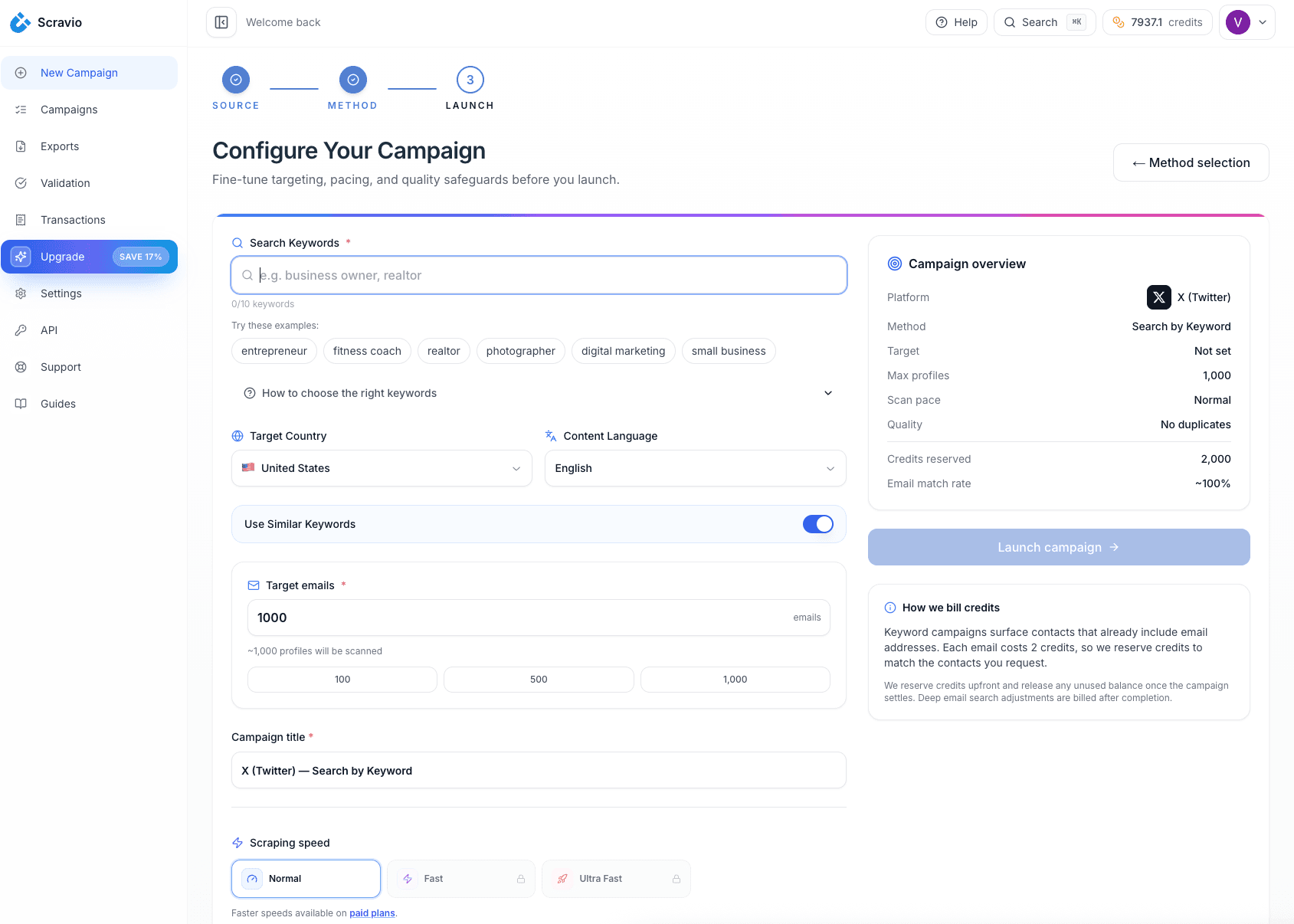
Scraping emails from Twitter followers is great for breadth, but Twitter search results let you find users who are actively talking about your topic right now.
Choose High-Intent Keywords and Hashtags
The key to scraping twitter data from search is to focus on high-intent queries, not just broad buzzwords.
Low‑intent keywords:
-
“marketing”
-
“startup”
-
“growth”
High‑intent queries for cold email and lead generation:
-
“cold email tool for SaaS founders”
-
“how to scrape emails from twitter x”
-
“twitter email scraper no code”
-
“find leads from twitter followers”
-
“emails from twitter for b2b outreach”
You can build lists of hashtags and phrases for your specific niche, then use a twitter scraper to collect data from user profiles that match those queries. Over time, these intent buckets become a reliable source of more leads aligned with real purchase behavior.
Collect Profiles from Twitter/X Search Results
From each keyword or hashtag:
-
Use Twitter search results (People and Latest tabs) to find user profiles that match your ICP.
-
Prioritize profiles with clear job titles (founder, CMO, VP Sales, Head of Growth) and a business website.
-
Feed search URLs into a twitter scraper capable of scraping Twitter data from search pages.
The scraper will collect data such as:
-
User profiles (handle, username, bio, follower count).
-
Profile data like website URL and location.
-
Sometimes engagement metrics or historical tweets, depending on the tool.
Your goal is not just to scrape emails from twitter keyword search once, but to build repeatable, large scale data collection around specific queries that keep surfacing new users.
Turn Keyword Matches into Verified Email Leads
After collecting user profiles from keyword searches:
-
Extract emails from Twitter profiles and linked sites using the same logic as with followers.
-
Explicitly tag each contact with the keyword or hashtag that generated it (“source: keyword = cold email tool for SaaS founders”).
-
Verify those emails so that your keyword-based segments contain only valid email addresses.
These keyword segments tend to produce hyper targeted emails, because you know exactly what problem or tool the recipient was just talking about. They are also easier to prioritize in your sales pipeline: someone who tweeted “looking for a twitter email scraping tool” clearly has more intent than a random follower.
How to Scrape Emails from Tweet Engagement (Likes, Replies, Retweets)
Tweet engagement is one of the most overlooked data sources on Twitter/X. Users who like, reply, quote or retweet content about your problem space are often great leads.
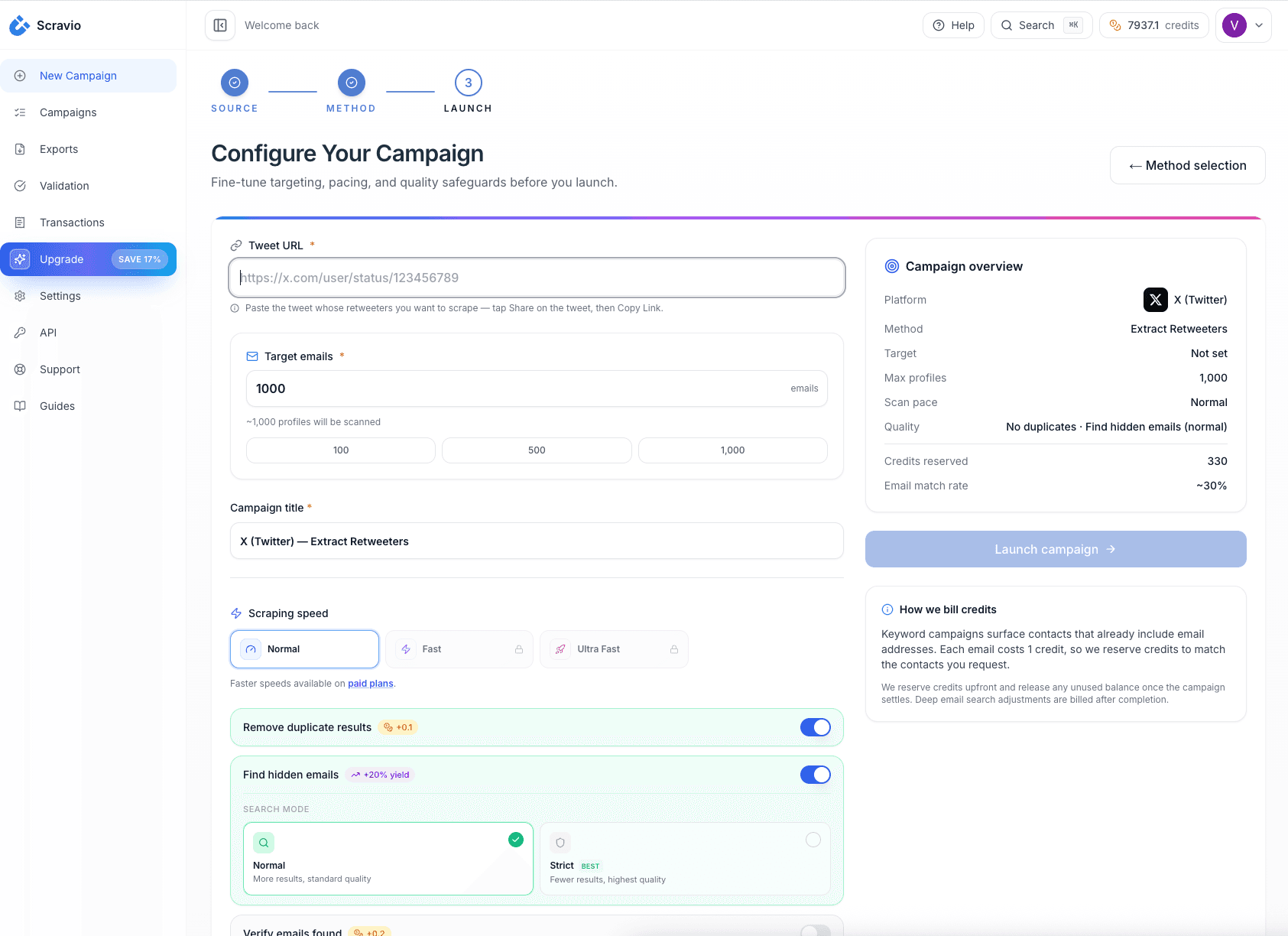
Pick Tweets That Reveal Buying Intent
Not every tweet is helpful. Focus on tweets that generate meaningful engagement metrics around specific problems or tools.
Examples:
-
A thread about cold email deliverability or how campaigns ended up in spam.
-
A tweet asking explicitly: “Any tools to scrape emails from twitter followers or keyword search?”
-
A breakdown of a lead generation system built entirely from Twitter activity and email.
From your own account, from competitors and from niche experts, pick tweets where:
-
The topic is tightly aligned with cold email, scraping Twitter data or B2B growth.
-
Engagement metrics (likes, replies, retweets) come from user profiles that match your ICP.
Extract Emails from Likers, Repliers and Retweeters
Then:
-
Use a twitter scraper that supports tweet engagement to collect data on all likers, repliers and retweeters.
-
For each engager, extract emails from Twitter profiles and linked sites.
-
Optionally, look at historical tweets if you need extra context about their role or interests.
You will end up with extracted data that links each email to a specific tweet and engagement type, which is extremely powerful for personalization and segmentation.
Use Engagement Data to Personalize Outreach
Because you know exactly how each user interacted with your content or your competitor’s content, your cold email becomes a natural continuation of a public conversation.
For example:
-
Subject: “Saw your reply about scraping Twitter emails”
-
Opening: “I noticed your comment on that thread about scraping emails from Twitter without coding skills — we ran into the same problem before we built our current workflow.”
-
Body: “Right now we use a twitter email scraper as a data extraction layer and Scravio to validate and route the verified emails into our CRM…”
This kind of context reduces the “scrape spam” feeling and makes your outreach feel targeted and relevant rather than random scraping Twitter behavior.
Manual vs No‑Code Tools: The Fastest Ways to Scrape Emails from Twitter/X
At this point, the question is whether you should keep scraping Twitter manually or switch to a dedicated email scraper or twitter email scraper tool.
When Manual Search Still Works Best
Manual scraping or light use of browser extensions is fine when:
-
You only need a small batch of emails from Twitter (20–50 records) to validate an offer.
-
You are mapping a specific niche and want to read user profiles deeply.
-
You are still learning and do not want to commit to any powerful tool yet.
Pros:
-
Zero learning curve, no need for technical skills.
-
Strong qualitative insight because you read bios, tweets and context.
Cons:
-
Hard to reach scale.
-
Error‑prone and time‑consuming.
When No-Code Twitter/X Scrapers Save Time
Once you need consistent, large scale data collection — hundreds or thousands of emails from Twitter per month — a no‑code twitter email scraper is the practical choice.
A good email scraper for Twitter usually offers:
-
Input options: single accounts, multiple accounts, search URLs, lists of twitter usernames or tweet URLs.
-
Key features such as:
-
Scrape emails from Twitter profiles, followers and likers.
-
Export options to CSV file or direct integrations.
-
Basic security measures, like rate limit handling and optional captcha solving.
-
-
Multi platform support, letting you reuse similar workflows on other platforms once Twitter proves ROI.
The tool automates most of the heavy lifting: it collect data, performs data extraction on public Twitter profiles and returns contact details you can filter and refine. You still need to think about legal compliance, email quality and downstream workflows, but the scraping itself becomes a solved problem.
Scravio then acts as the workflow layer that:
-
Ingests CSV files from email scraper tools.
-
Validates and deduplicates scraped twitter emails.
-
Tags segments by source (followers, search, engagement) so you can measure what actually produces more leads and more replies.
-
Sends clean, verified emails into your CRM and outbound tools.
How to Choose the Right Method for Your Volume
Ask yourself:
-
How many emails from Twitter do I need per week?
-
Is this a one‑time project or an ongoing source of qualified leads?
-
Do I have the technical skills for a custom setup, or do I prefer a no‑code experience?
Rough rule:
-
Low volume and high touch → manual + simple browser‑based twitter scraper.
-
Higher volume and recurring campaigns → dedicated twitter email scraping tools + a workflow platform like Scravio to keep everything clean and compliant.
You do not have to build this workflow from scratch. If you already use a Twitter email scraper or plan to try one, you can plug its CSV output directly into Scravio, clean and validate the emails, and sync only verified leads into your CRM and cold email tool. You can test this end‑to‑end flow with 100 free credits at scravio.com and see how much manual work it removes from your Twitter/X lead generation.
Is It Legal and Safe to Scrape Emails from Twitter/X in 2026?
Legal compliance and safety should be built into your approach from day one.
Use Only Publicly Available Contact Data
Keep your workflow limited to:
-
Public twitter profiles and publicly available data.
-
Publicly available email addresses on websites linked from those profiles.
-
Public tweets and replies.
Avoid scraping any sensitive data from Twitter, logging into multiple accounts just to bypass limits, or collecting personal emails for uses that have nothing to do with the user’s professional interests.
Respect Twitter’s Terms and Automation Limits
Respect Twitter’s terms by:
-
Avoiding abusive patterns that look like spam.
-
Not running scraping bots across multiple accounts simply to hit higher volumes.
-
Throttling your scraping twitter jobs to stay within reasonable request rates.
Building a sustainable system is more valuable than chasing short‑term volume.
Follow GDPR and Cold Email Best Practices
Align your twitter email scraping with core cold email best practices:
-
Keep messages clearly related to the recipient’s role and public activity.
-
Provide a clear opt‑out and respect it.
-
Protect your domains and IPs with healthy sending patterns and avoid blasting scraped lists.
Legal compliance is not only about laws; it is also about respecting users and using data from Twitter in a way that makes sense for them.
Best Practices: Data Quality, Email Validation and Deliverability
Even the best scraping twitter setup will fail if you ignore data quality and deliverability.
Validate Emails Before You Send Anything
Always run scraped twitter emails through a validation step:
-
Verify MX records and mailbox existence where possible.
-
Separate valid email addresses from invalid ones and catch‑all domains.
-
Ensure emails verified as valid are the only ones going into your campaigns.
This is the simplest way to prevent hard bounces from wrecking your sender reputation.
Remove Low-Quality and Duplicate Leads
Focus on:
-
Removing duplicate entries across different scraping runs.
-
Filtering out low‑quality leads with no link to your ICP.
-
Maintaining good email quality standards so your lists stay small, focused and effective.
Protect Deliverability with Better Segmentation
Segmenting scraped emails from Twitter by source and intent lets you:
-
Write hyper targeted emails that feel relevant.
-
Protect deliverability by warming new segments gradually.
-
See which sources (followers vs search vs engagement) drive more leads and revenue.
Frequently asked questions
Can you really scrape emails from Twitter followers?
Yes. As long as you stick to public Twitter profiles and publicly available email addresses, you can scrape emails from Twitter followers and turn them into B2B leads.
Do I need coding skills to scrape emails from Twitter/X?
No. Many no‑code twitter email scraper tools handle data extraction with just a few clicks, and they export to CSV so you can work without writing code.
Are scraped Twitter emails reliable enough for cold email?
If you validate them and keep your lists focused, scraped twitter emails can be high‑quality leads, especially when built around clear search results, engagement metrics or a specific niche.
Is scraping Twitter data legal for outreach?
Using public data from Twitter in a responsible way and aligning with GDPR and email regulations is generally acceptable for B2B contexts, but you should always review legal compliance for your region and use case.
Start your first campaign with 100 free credits
Verified emails from Instagram, Facebook, LinkedIn, X, YouTube, and TikTok — all in one cloud workflow. No card required.