
Instagram CommentersEmail Scraper
Paste a public Instagram post URL.
Scravio scans the commenters, extracts email addresses when present, and exports a clean lead list you can actually use.
- Built-in deduplication
- Email verification
- CSV/Excel Export
Example commenter campaign workflow
How Scravio Extracts Emails from Post Commenters
Commenters are the highest-intent audience on a post — they didn't just view or like. They took time to write. This tool makes that engagement actionable.
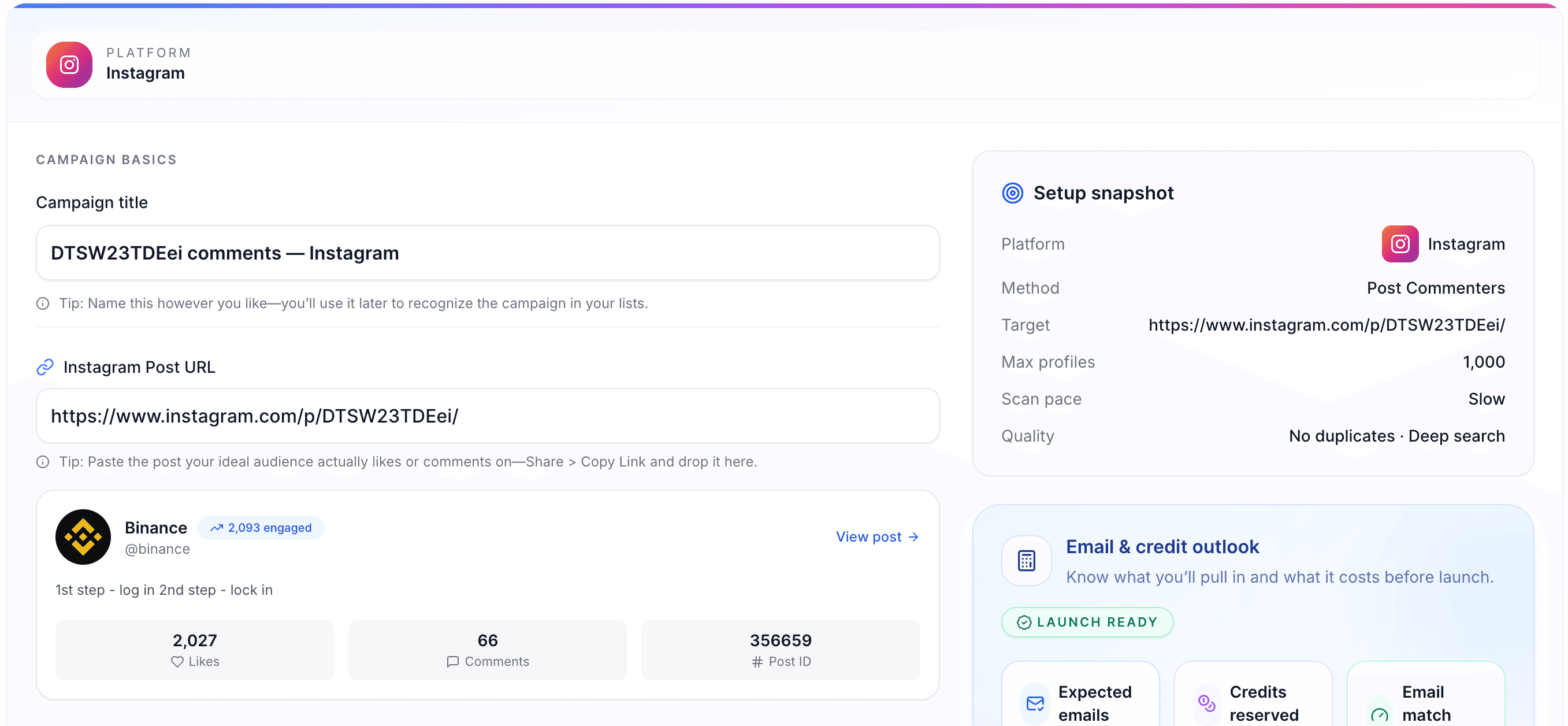
Paste a Public Post URL
Copy the link of a public Instagram post (photo, reel, or carousel) and paste it in Scravio.
Best results tip:
Attract commenters with specific questions
Find people evaluating options
Commenters show clear intent
Pro Tip
Pick posts that will attract your ideal audience. Private or restricted posts cannot be scanned.
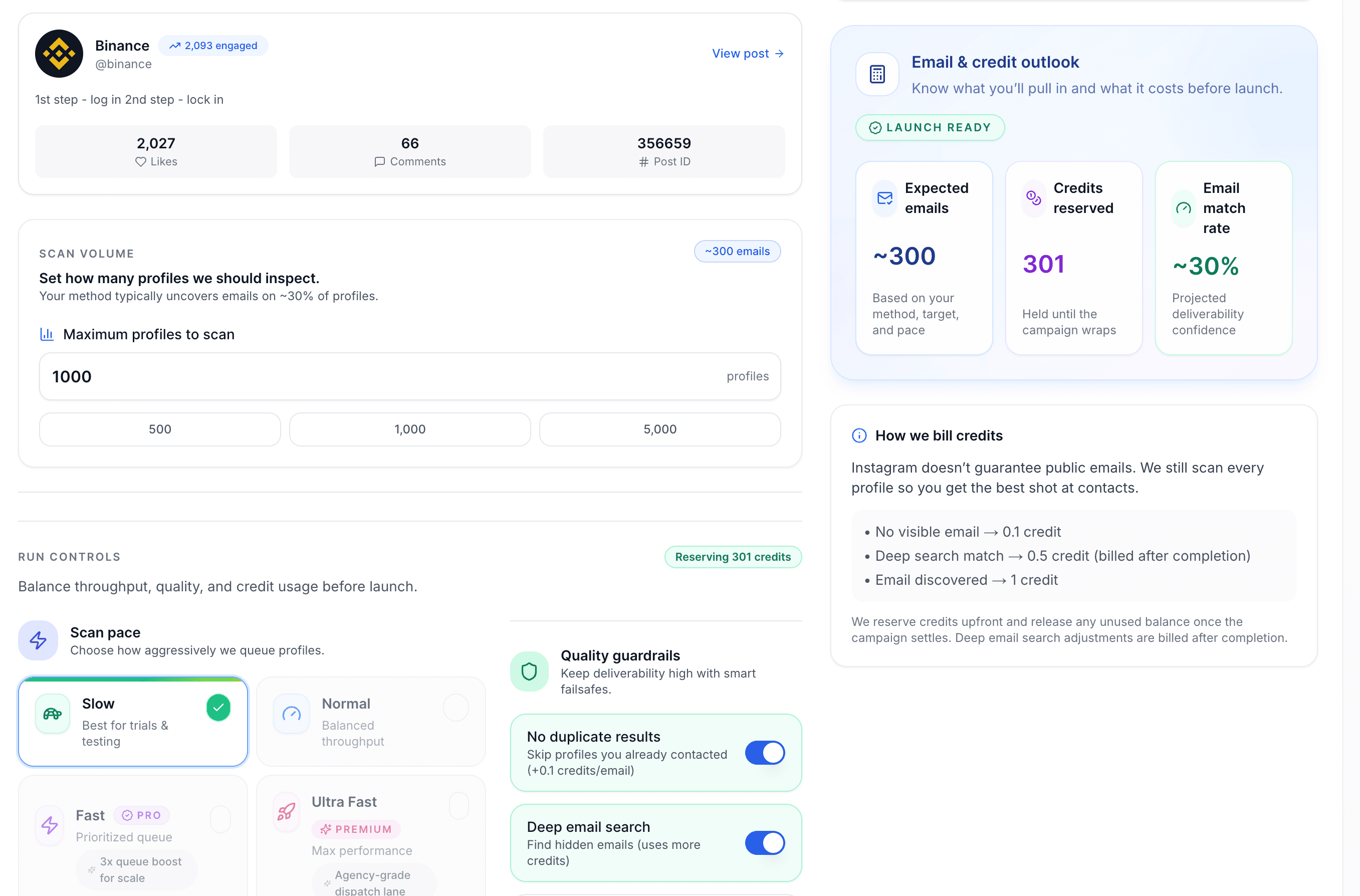
Extract Commenters & Find Emails
Scravio gathers the authors of comments from that post and searches for publicly available emails.
What you get:
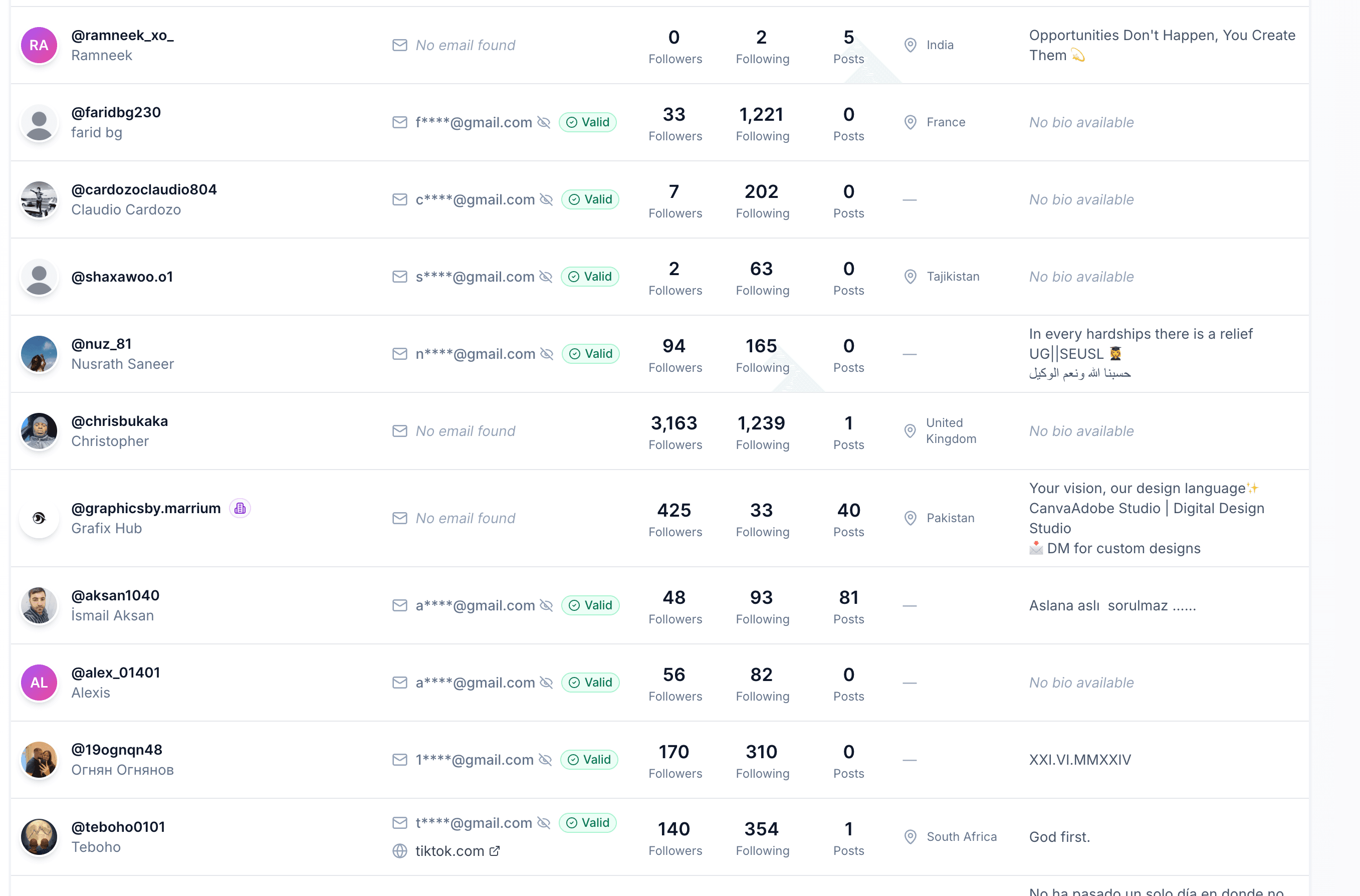
Clean, Deduplicate & Export
Scravio processes the output for real-world use.
What is an Instagram Commenters Email Scraper?
A tool that takes a single public post URL, gathers the people who commented, extracts emails (if present), and exports results for outreach, partnerships, and research.
Input
One public Instagram post URL — one post per campaign to keep it clean.
Source
The people who commented on that post — highest-intent engagement data.
Output
Structured export with emails (when public), profile data, bio text, and business indicators.
Important Notes
- • Emails can only be matched if users have made them public
- • This technique extracts public data only (no private profiles/posts)
- • If your goal is different, use the right method: Likers, Followers, or Hashtag
Email Quality: Verification + Deduplication
Scraping is only useful as long as the output is clean. Scravio ensures your exports are ready for real-world use.
Verification (Reduce Bounces)
When an email is detected, Scravio checks it and adds an is_email_valid field so you can prioritize better contacts.
Deduplication (No Messy Exports)
If the same person comments more than once or if you scan multiple posts, duplicates are handled so your list stays clean.
Source Tracking (Personalization)
The best approach with comment-based outreach is knowing context. Save the original post URL for personalization ("Saw your comment on...").
Why Commenters Are the Highest-Intent Audience
"Likes" are lightweight. Comments are effort. That extra step reveals real intent.
More Engaged
They read, think, and respond. Comments require effort that likes don't — signaling genuine interest.
More Specific
Comments often reveal intent: "Where did you buy this?", "Can you ship to...?", "Do you do partnerships?"
More Segmentable
You can prioritize by comment type: questions, requests, recommendations, complaints, or interest signals.
Improve Your Email Match Rate
You won't receive emails from everyone — here's how to get better results without being spammy.
Choose posts where business accounts are common
Higher email density niches typically include:
Prefer "action" posts over "entertainment"
Posts asking for these tend to attract profiles with contact info:
Scan multiple relevant posts
A single post can be noisy. A cluster of 5-20 highly relevant posts usually generates better quality and overlap you can dedupe.
Segment before outreach
Even a "warm" list can do poorly if you blast everyone. Segment by:
When to Use Commenters Scraping
Commenters scraping works best when you need leads from people who've shown real engagement through their words.
High-intent lead discovery
Look for people actively talking about a competitor's offer: product launches, promo posts, "new drop" announcements. Commenters include buyers asking questions.
Partnership & collab sourcing
Many creators and business accounts comment to network. Build a shortlist of micro-influencers, brand accounts, and service providers.
Market research
Export commenters and analyze themes: What do they ask? What do they complain about? Use their "voice of customer" for landing pages and FAQs.
Community & ambassador programs
Repeat commenters tend to be future ambassadors, engaged community members, UGC creators, and early supporters.
Local prospecting
Scan posts like "Best cafes in Bangkok?" or "Looking for a videographer". Commenters often include businesses self-identifying ("DM us", "We can help").
Combine Commenters With Other Methods
Different goals need different sources. Use the approach that fits your targeting.
Likers Email Scraper
People who reacted but didn't say anything. Lighter signal but more volume.
Try Likers →Followers Email Scraper
The whole audience of a competitor or influencer. Scale with volume.
Try Followers →Hashtag Email Scraper
Discovery at scale by topic. Great for niche-based prospecting.
Try Hashtags →Common workflow: Start with Commenters (highest intent) → Expand with Likers on the same post → Scale with Followers and Hashtags for volume.
Start free with 100 credits
Run your first commenters email extraction campaign — no credit card required.
Email Scrapers for Other Platforms
Need emails from other social networks? Explore our full suite of email extraction tools.
Frequently Asked Questions
1Does Scravio scrape emails from Instagram post commenters?
Scravio only finds emails that are publicly available from the profile of a commenter (or other public signals).
2Why don't all commenters have an email address?
Many users don't publish an email publicly. In some niches, email match rates are naturally lower.
3Can I scan commenters from a private post?
No. This tool only works with public posts. Private posts and private profiles are not supported.
4Does it work for Reels, photos, and carousels?
If the post URL is public and accessible, it can be used as a source.
5Does it extract replies (threaded comments) too?
Scravio can include replies as part of commenters. Exports are deduplicated so it does not get cluttered with the same participation.
6What formats can I export?
CSV and Excel (.xlsx).
7Will I get duplicates if someone comments multiple times?
No. The results are deduplicated so you can work with a clean list.
8How many commenters can I scan from a post?
It depends on the post size, campaign settings, and processing limits. You can usually set the number of profiles to process per run.
9How do I improve my email match rate?
Select posts and niches where business accounts are common, scan various relevant posts, and prioritize profiles with websites and business signals.
10Is this safe to use for outreach?
Scravio only takes data that is publicly available. You are responsible for outreach compliance and best practices in your area.
11What data is included in the export?
Common fields include username, display name, profile URL, email (if public), website, bio, follower/following numbers, business indicators, and country.
12How long does a commenters scan take?
Timing is influenced by the post size, filters, and platform rate limits. Most runs finish in a few minutes, but big posts can take longer.
Responsible Use, Privacy, and Compliance
- • Scravio extracts publicly available information only.
- • Private posts and private profiles are not supported.
- • Outreach laws and platform rules differ by country and use case. You are responsible for compliance, consent, and respectful messaging.
Start Extracting Emails from Instagram Commenters
Copy a public post URL, let Scravio extract commenters and public emails, and export a clean list for outreach or research.