Twitter Likers & Repliers Email Leads: High-Intent Playbook
Turn Twitter/X likes and replies into qualified B2B email leads with intent scoring, ICP filters and Scravio's Twitter Email Scraper workflow.

On this page (11 sections)
Twitter/X likes and replies can reveal people who are actively engaging with a problem, workflow or product category. Unlike a traditional lead list built only from static attributes such as job title, company size and location, engagement data provides additional context about what a prospect recently noticed, discussed or questioned.
However, a like does not automatically turn someone into “ready to buy.” A reply does not always reflect commercial intent either. The real opportunity is to combine Twitter engagement with ICP fit, public business contact data, email verification and responsible outreach, rather than treating every engager as a high-intent lead.
This playbook explains how to turn Twitter likers and repliers into qualified email leads while preserving the context that made each profile relevant in the first place.
What Are Twitter Likers and Repliers Email Leads?
Twitter likers and repliers email leads are contacts identified through their engagement with a selected public tweet.
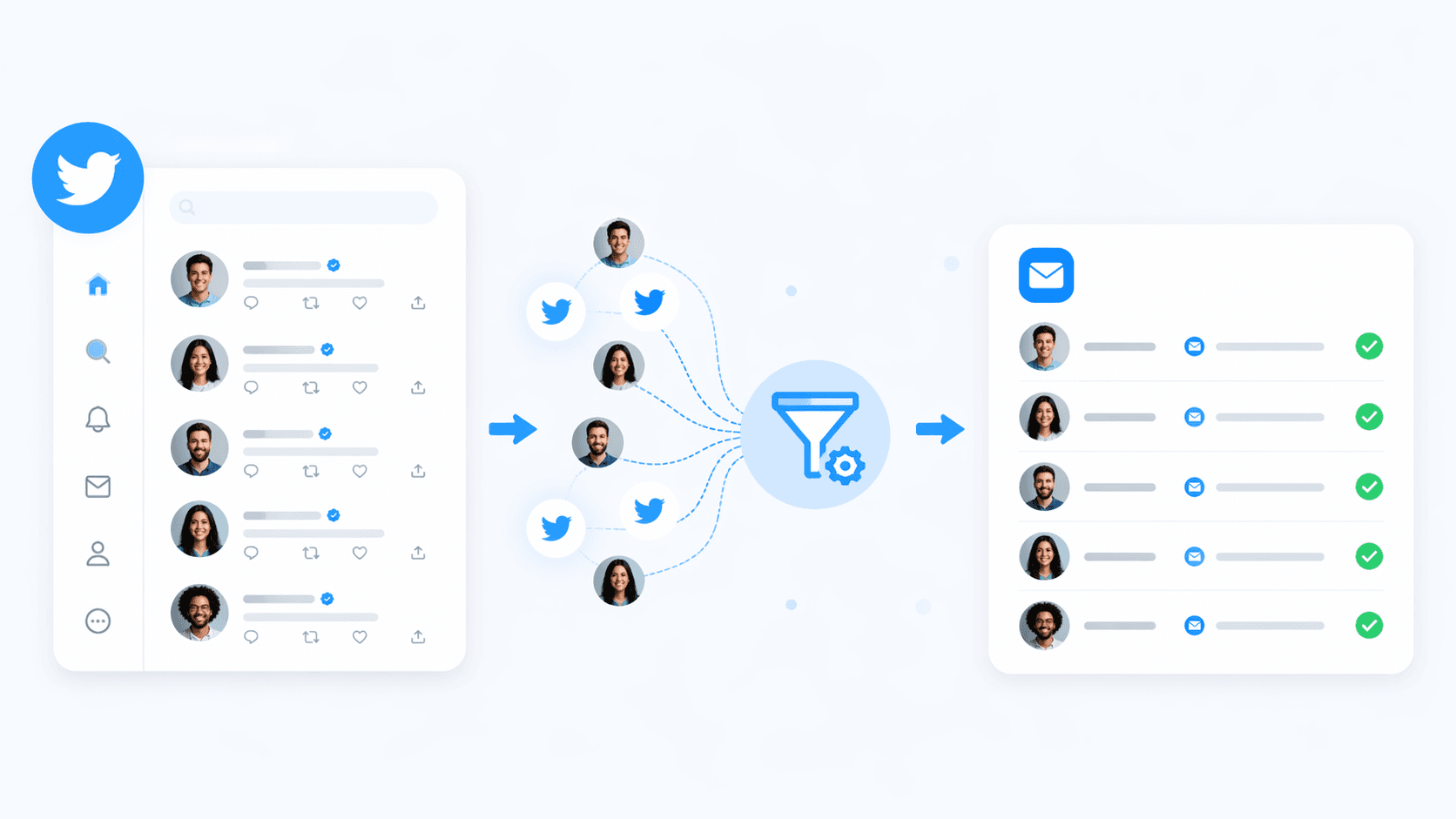
The process usually starts with a conversation related to a market problem. A sales or marketing team identifies a relevant tweet, reviews the people who liked or replied to it and evaluates whether those profiles match its target audience. Suitable public business contact information can then be found, checked and organized for outreach.
For example, consider a founder who posts:
“What is the most reliable way to build a B2B contact list without relying entirely on a static database?”
The people engaging with this post could include:
-
SaaS founders exploring new prospecting workflows.
-
Sales leaders concerned about outdated contact data.
-
Agencies comparing lead generation tools.
-
Consultants recommending their own services.
-
General users who simply agree with the post.
-
People with no commercial connection to the topic.
These users should not all enter the same email sequence.
Engagement provides a reason to review a profile. Qualification determines whether that profile should become an email lead.
A qualified Twitter engagement lead normally has four elements:
-
A relevant interaction with a specific public conversation.
-
A professional profile that fits the campaign’s target audience.
-
An appropriate public business contact point.
-
A legitimate and relevant reason for outreach.
For a broader comparison of how Twitter/X engagement fits alongside followers and keyword search, see the guide on how to scrape emails from Twitter/X followers and keyword searches.
Are Twitter Likers and Repliers Really High-Intent Leads?
Some may be high intent, but the description should only apply after qualification.
Calling every engager a high-intent lead creates two problems. First, it overstates what social engagement can prove. Second, it encourages teams to collect and contact people before checking whether they are actually relevant.
What a Twitter Like Can Indicate
A like is a low-effort action. It may mean the user:
-
Agrees with the post.
-
Finds the content useful.
-
Wants to save it for later.
-
Supports the author.
-
Is generally interested in the topic.
-
Recognizes the problem without actively seeking a solution.
The meaning of a like depends heavily on the source tweet.
A like on a broad motivational post provides little commercial context. A like on a detailed comparison between two SaaS tools or a post about a narrow operational problem can provide a stronger signal.
If you are already scraping emails from followers and search, integrating engagement-based lists into the same workflow lets you compare all three sources side by side using the Twitter/X scraping playbook.
What a Twitter Reply Can Indicate
A reply usually requires more effort and may contain useful context. It can reveal:
-
A current operational problem.
-
Dissatisfaction with an existing solution.
-
A request for recommendations.
-
A feature or pricing question.
-
An objection.
-
A relevant use case.
-
The user’s stage of problem awareness.
Replies still need interpretation. Some are jokes, criticism, educational comments or unrelated conversations. The content matters more than the existence of the reply.
Four Layers of Lead Quality
Use four layers to evaluate whether an engager is worth prioritizing:
-
Engagement relevance
Is the source tweet closely related to the problem or category we address? -
Behavioral context
Did the person like, reply, compare, ask or describe a problem? -
ICP fit
Does the person’s role, company, industry or use case match our target customer? -
Contact suitability
Is there an appropriate public business contact point and a reasonable basis for outreach?
A detailed reply from someone outside your market may not be a suitable lead. A liker with the exact role, company profile and use case you target may deserve more attention than an unrelated replier.
How to Find Email Leads from Twitter Likers and Repliers
A reliable workflow follows this order:
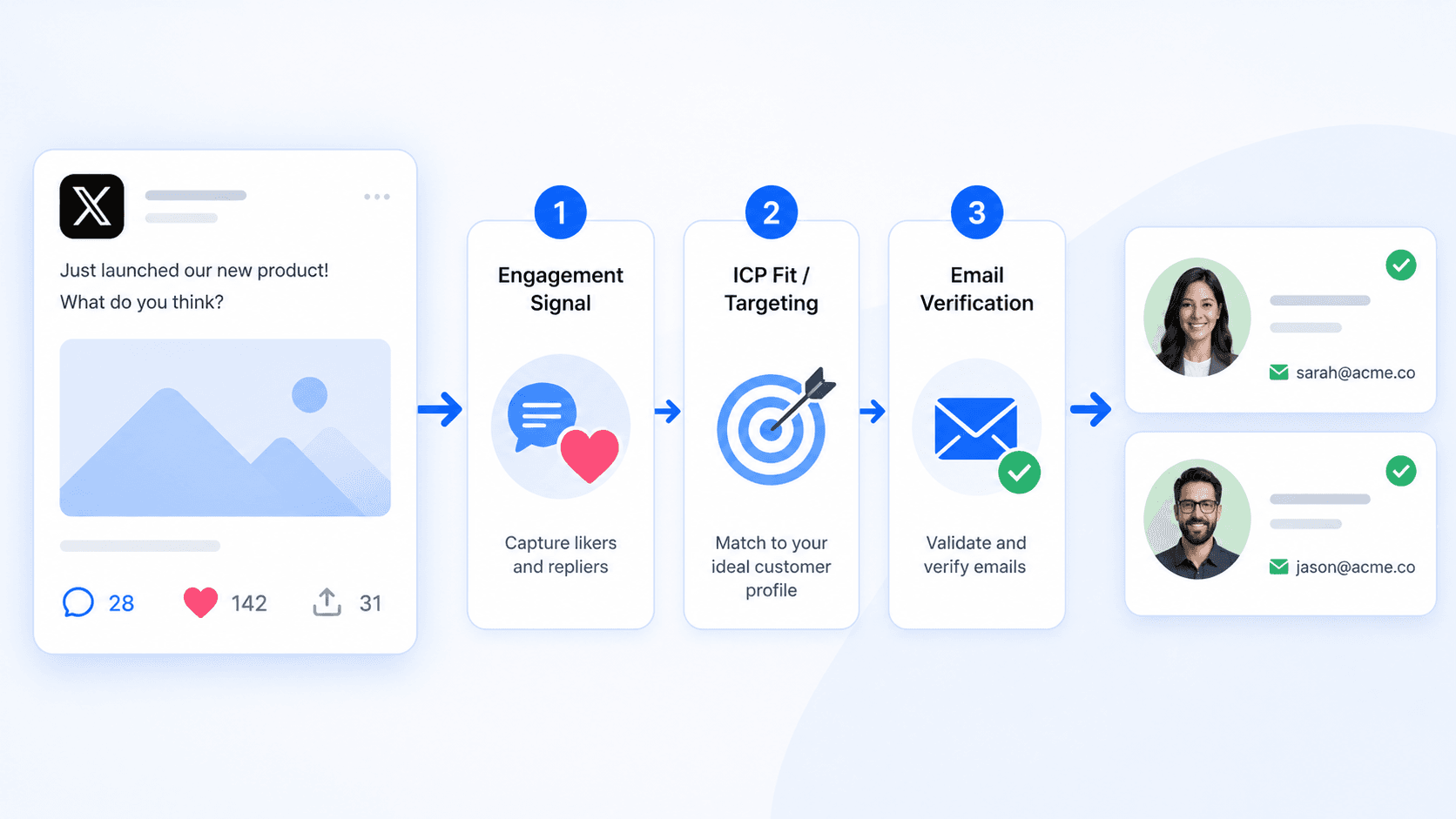
Select the conversation → retain engagement context → qualify the profile → find suitable public contact data → verify → segment → contact responsibly.
Reversing this order usually creates a large but weak list.
Step 1: Define the Campaign Before Selecting a Tweet
Start by writing down:
-
The target role.
-
The target company type.
-
The problem your offer addresses.
-
The geographic market, when relevant.
-
The professional use case.
-
The action you want a qualified prospect to take.
For example:
Heads of Growth at small B2B SaaS companies that are actively discussing contact-data quality and outbound list building.
This definition makes it easier to reject attractive but irrelevant engagement.
If this is your first campaign with Scravio, you can use the same definition to configure your first Twitter/X email scraping project instead of starting from a static database.
Step 2: Choose Tweets Connected to a Specific Buyer Problem
Do not select a tweet only because it has a high number of likes.
Prioritize tweets discussing:
-
A clear operational challenge.
-
A failed process or tool.
-
A request for recommendations.
-
A comparison between available solutions.
-
Implementation difficulties.
-
Pricing or workflow questions.
-
A measurable result your offer can support.
Useful conversation patterns include:
-
“What tool do you use for…?”
-
“Is there an alternative to…?”
-
“How do you automate…?”
-
“We tried this, but…”
-
“Does this work for agencies?”
-
“How are teams solving…?”
-
“What is the best workflow for…?”
The tweet can come from your own account, an industry expert, a competitor, a publication or a relevant creator. The key requirement is alignment between the conversation and your target customer’s problem.
Step 3: Separate Likers from Repliers
Do not merge every user into one undifferentiated audience.
Create at least two initial cohorts.
Likers
Likers have shown lightweight interest but may not have provided enough context to justify direct sales outreach. They normally require stronger profile qualification and a softer message.
Repliers
Repliers provide written context that can be reviewed for pain, urgency, awareness and fit. They may support more specific segmentation, but only when the actual reply is relevant to the campaign.
Record the following information:
-
Twitter/X handle.
-
Display name.
-
Profile URL.
-
Source tweet URL.
-
Engagement type.
-
Reply summary, when applicable.
-
Engagement date.
-
Public bio.
-
Company or website.
-
Initial intent category.
The source context is part of the lead record. Without it, the result becomes another anonymous contact in a spreadsheet.
Step 4: Review Reply Context
Classify relevant replies according to what they reveal.
| Reply pattern | Possible interpretation |
|---|---|
| “Are there any alternatives?” | Vendor or solution evaluation |
| “How do you do this at scale?” | Implementation need |
| “Would this work for a small team?” | Product-fit question |
| “We tried this, but the data was outdated.” | Active pain and failed workflow |
| “How much does it cost?” | Pricing interest |
| “This approach does not work for our market.” | Objection requiring further context |
| General agreement | Topic interest, but limited buying context |
Do not assume that a critical or negative reply is a qualified sales opportunity. It may provide market insight without creating a valid reason to email the person.
Step 5: Filter Profiles Against Your ICP
Engagement does not replace firmographic and professional qualification.
Review each profile for:
-
Job title or professional role.
-
Company type.
-
Industry.
-
Business model.
-
Location.
-
Website domain.
-
Product category.
-
Professional focus.
-
Evidence of a relevant use case.
For a B2B SaaS campaign, suitable profiles might include founders, growth leaders, sales managers or agency owners discussing a workflow the product supports.
Remove or deprioritize:
-
Bots and automated accounts.
-
Giveaway or engagement-farming profiles.
-
Accounts unrelated to the target market.
-
Profiles without enough professional context.
-
Users whose replies are clearly irrelevant.
-
Personal contacts with no reasonable business connection.
-
People who have previously opted out.
Qualification reduces list size, but it makes the remaining records more useful.
If you need to extend beyond Twitter/X, the same Scravio account can also run Instagram, LinkedIn, YouTube, Facebook and TikTok scrapers so you can build a multi-channel outbound engine on one stack.
Step 6: Find Appropriate Public Business Contact Information
An X account’s private registration email is not publicly displayed. Contact research therefore relies on information people or organizations have made publicly accessible for professional communication.
Possible sources include:
-
A business email published in the bio.
-
A company website linked from the profile.
-
A public Contact or About page.
-
A professional portfolio.
-
A public creator or business landing page.
-
Another linked professional profile.
Before retaining an email, ask:
-
Is this contact point intended for professional communication?
-
Is the campaign relevant to the person’s role?
-
Can the source of the contact information be documented?
-
Is there a clear reason for including this person?
-
Has the address been checked before sending?
-
Has the person previously objected to outreach?
If you are unsure about the difference between private account emails and public contact emails, review the explainer on where Twitter/X shows email addresses and how public contact details typically appear.
Skip the record when the professional connection is unclear or the available contact information appears unsuitable.
Step 7: Verify and Deduplicate the Results
Email verification can help identify malformed, invalid or higher-risk addresses before they enter an outreach platform. It is a risk-reduction step, not a guarantee of delivery.
An address can still bounce because:
-
The mailbox was recently disabled.
-
The receiving server changed its rules.
-
The domain accepts all addresses without confirming individual mailboxes.
-
The recipient’s organization blocks or filters the message.
-
The address was valid when checked but changed later.
Deduplicate records by more than email address. The same person may appear across several tweets, profiles or campaigns.
Useful deduplication fields include:
-
Email address.
-
Twitter/X handle.
-
Website domain.
-
Company name.
-
Profile URL.
Preserve all relevant source tweets under one contact record rather than contacting the same person repeatedly.
Step 8: Structure the Lead List
A useful export should contain enough context for review and personalization.
| Field | Purpose |
|---|---|
| Name | Basic identification |
| Twitter/X handle | Source reference |
| Profile URL | Manual profile review |
| Contact field | |
| Verification status | Data-quality control |
| Engagement type | Liker or replier segmentation |
| Source tweet | Conversation context |
| Reply summary | Pain point or evaluation signal |
| ICP status | Fit assessment |
| Intent score | Prioritization |
| Campaign angle | Outreach planning |
| Opt-out status | Suppression management |
Do not send the raw export directly into an automated sequence. The final outreach list should usually be smaller than the original engagement audience.
Step 9: Segment Before Outreach
Segment by behavior and business fit instead of creating one generic campaign.
Useful cohorts include:
-
Repliers describing an active problem.
-
Repliers asking for a recommendation.
-
Repliers comparing products or workflows.
-
Likers with strong ICP fit.
-
Likers with incomplete profile context.
-
Existing followers who also engaged.
-
Profiles that should be warmed on-platform first.
-
Contacts that should not receive outreach.
Each segment needs a different objective.
A user asking about implementation may benefit from a practical workflow. A person comparing vendors may need a clear fit explanation. A liker who has not expressed a need may be better suited to a useful resource or no email at all.
A Practical Twitter Engagement Intent Score
Intent scoring should help teams prioritize manual review. It should not be presented as a prediction that someone will purchase.
Use a simple additive model that can be explained and audited.
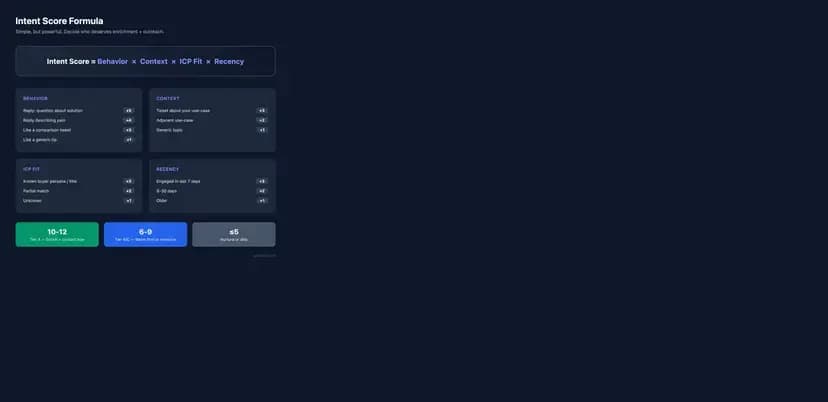
Engagement score
-
Reply asking about a product, solution or price: +5
-
Reply describing a relevant problem: +4
-
Reply sharing a related use case: +3
-
Like on a comparison or problem-specific tweet: +2
-
Like on a broad educational tweet: +1
ICP-fit score
-
Strong role, company and use-case match: +4
-
Strong role match with incomplete company information: +3
-
Partial match: +2
-
Fit unknown: +1
-
Clearly outside the ICP: 0
Recency score
-
Engaged within the last seven days: +3
-
Engaged between eight and 30 days ago: +2
-
Engaged more than 30 days ago: +1
Contact-context score
-
Public business contact with clear professional relevance: +2
-
Public contact found but relevance requires review: +1
-
No suitable business contact: 0
The maximum score is 14.
Total score → Suggested action
-
11–14: Review for timely and highly relevant outreach.
-
8–10: Qualify further or lead with a useful resource.
-
5–7: Warm on-platform or place in a lower-priority segment.
-
0–4: Exclude from direct email outreach.
A high score does not create consent, establish legal eligibility or prove commercial interest. Human review remains necessary.
Are Repliers Better Leads Than Likers?
Repliers often provide more context, but they are not automatically better leads.
Their comments can reveal:
-
Objections.
-
Use cases.
-
Evaluation criteria.
-
Urgency.
-
Existing solutions.
-
Implementation concerns.
This context can make prioritization and messaging easier.
Likers still matter. A liker who closely matches the ICP may be more valuable than a detailed replier from an unrelated market.
The practical distinction is:
-
Repliers provide more behavioral context.
-
Likers usually require more profile-level qualification.
Lead quality comes from the combination of behavior and fit, not from engagement type alone.
How to Personalize Outreach Without Sounding Invasive
Use the public conversation to improve relevance, not to demonstrate how closely someone was monitored.
Avoid opening with:
“I saw that you liked a tweet at 2:14 p.m., so I found your email.”
This emphasizes tracking and gives the recipient little value.
A better structure is:
-
Reference the broader professional discussion.
-
Connect it to a relevant business problem.
-
Provide one useful observation.
-
Offer an appropriate resource or next step.
-
Use a low-friction call to action.
-
Identify yourself clearly.
-
Make opting out simple.
Reply-based outreach example
Subject: A quick thought on your question about {topic}
Hi {First name},
I came across your question in a public discussion about {topic}. You mentioned {brief problem summary}, which is a challenge we often see among {relevant team type}.
One possible approach is to {short, useful suggestion}. We also created a brief workflow for {specific outcome}.
Would it be useful if I sent it over?
— {Name}
{Company}
{Simple opt-out line}
Liker-based outreach example
Subject: Resource for {topic}
Hi {First name},
I noticed you engage with conversations around {topic}, and your work in {role or company context} looked closely aligned with the ICPs we usually serve.
We created a short checklist for {specific problem}. It may be useful if your team is currently reviewing that workflow.
Should I send it?
— {Name}
{Company}
{Simple opt-out line}
Do not claim that a liker is actively searching for a solution unless their public activity supports that conclusion.
How to Measure Twitter Engagement Lead Quality
Do not evaluate the campaign only by the number of email addresses collected.
Track the full funnel:
| Metric | What it helps evaluate |
|---|---|
| Profile-to-contact match rate | How often an appropriate business contact can be found |
| Verification status | Whether the collected data appears usable |
| ICP qualification rate | Whether the selected tweet attracted the right audience |
| Reply rate | Whether recipients respond |
| Positive reply rate | Whether responses indicate genuine relevance |
| Opt-out rate | Whether targeting or messaging is too broad |
| Meeting rate | Whether the segment creates sales conversations |
| Opportunity rate | Whether meetings develop into qualified pipeline |
Keep likers and repliers in separate cohorts. This allows you to compare whether the extra context available from replies improves results.
A useful campaign test could include:
-
Cohort A: qualified likers.
-
Cohort B: all qualified repliers.
-
Cohort C: qualified repliers above a defined intent-score threshold.
To design these tests across followers, search and engagement, you can reuse the structure from the Twitter/X followers and keyword search email scraping guide and add an engagement-only cohort.
Keep the offer, sending setup and testing period as consistent as possible. Use the results to refine your own scoring model rather than claiming that one engagement type always performs better.
Common Mistakes When Building Leads from Twitter Engagement
Treating Every Like as Buying Intent
A like can indicate agreement, curiosity or support. Pair it with tweet specificity and ICP fit before prioritizing the user.
Selecting Viral but Irrelevant Tweets
High engagement cannot compensate for weak audience relevance. A smaller niche conversation may produce a more useful segment.
Losing the Source Context
An email without its source tweet, engagement type and profile information cannot support meaningful personalization or reliable review.
Sending the Same Message to Every Engager
Repliers may have identified a specific problem. Likers often need a softer approach. Different intent levels require different messaging.
Assuming Verification Guarantees Delivery
Verification can reduce avoidable risk, but it cannot eliminate all bounces or guarantee inbox placement.
Contacting People Without Professional Relevance
Public availability does not make every address appropriate for every campaign.
Ignoring Previous Opt-Outs
A suppression request should apply to future campaigns, not only the sequence in which it was received.
Over-Personalizing Online Behavior
Reference the professional topic or problem. Do not list detailed observations that make the recipient feel monitored.
How Scravio Supports a Twitter Engagement Lead Workflow
Once a relevant tweet and qualification criteria have been defined, Scravio can support the contact-discovery and data-preparation stages of the workflow.
Scravio’s Twitter Email Scraper allows users to target profiles associated with Twitter/X likes, replies, retweets, followers, following lists, communities and keyword searches. You can start directly from the Scravio to see all supported data sources across Instagram, Facebook, LinkedIn, X, YouTube and TikTok.
For a likers and repliers campaign, the operational process is:
-
Select a tweet connected to a clear buyer problem.
-
Choose the relevant engagement source.
-
Enter the tweet URL as the campaign target.
-
Let the cloud-based workflow process publicly accessible profiles and linked public sources.
-
Review the available profile and contact information.
-
Check verification status and remove unsuitable records.
-
Export the selected results to CSV or Excel.
-
Add the source tweet, reply summary and internal intent score.
-
Segment the final list before outreach.
-
Measure outcomes by engagement type.
Scravio does not require users to connect a Twitter/X account for this workflow. It focuses on publicly accessible pages and linked public information rather than private account registration emails.
New accounts currently receive free credits with no card required. Use the first campaign as a controlled relevance test instead of maximizing the number of profiles collected.
Responsible Use of Public Twitter and Email Data
Publicly available does not mean unrestricted.
Before using engagement data for outreach:
-
Use information from legitimate public sources.
-
Do not attempt to access private account data.
-
Contact people only when there is a reasonable professional connection.
-
Identify the sender and company clearly.
-
Explain the relevance of the message.
-
Provide a simple way to opt out.
-
Honor objections and maintain a suppression list.
-
Avoid collecting sensitive or unnecessary personal data.
-
Retain only the information required for the campaign.
-
Review the rules applying to the recipient’s location and contact type.
Scravio publishes additional details about its compliance and responsible-data approach, including how it sources public data, respects platform rules and supports GDPR-aligned use. These materials explain the platform’s practices, but each sender remains responsible for evaluating their own campaigns and applicable requirements.
This article provides operational guidance and is not legal advice.
Final Takeaway
Twitter likes and replies are valuable because they add timing and conversation context to lead research. They do not remove the need for qualification.
A reliable Twitter likers and repliers email lead workflow is:
Relevant tweet → engagement context → ICP review → suitable public contact discovery → verification → segmentation → responsible outreach.
Used carefully, this process can help SaaS, outbound and marketing teams prioritize more relevant prospects instead of simply adding more contacts to an unqualified list.
Frequently asked questions
Can you find emails from Twitter likers?
You may be able to find suitable business contact information from public profile details, linked company websites or other publicly accessible professional sources. Not every liker will have an appropriate email, and unavailable information should not be forced or guessed.
Are Twitter repliers better leads than likers?
Repliers often provide more context because their comments may reveal a question, problem or evaluation process. Lead quality still depends on ICP fit, professional relevance and contact suitability.
Does liking a tweet mean someone has buying intent?
No. A like can represent agreement, support, curiosity or an attempt to save the post. It becomes more useful when the source tweet is specific and the user also matches the target customer profile.
Can Scravio find emails from people who reply to a tweet?
Scravio supports targeting Twitter/X profiles associated with replies to a selected public tweet and then checking publicly accessible profiles and linked sources for available contact information.
Does Scravio access private Twitter account emails?
No. The private email used to register or manage an X account is not publicly displayed. The workflow focuses on public profile information and linked public web sources.
Does email verification guarantee that an address will not bounce?
No. Verification can reduce avoidable risk, but mailbox status, receiving-server rules and domain configurations can change. It cannot guarantee delivery or inbox placement.
Should every email found from tweet engagement receive outreach?
No. Each record should be reviewed for ICP fit, professional relevance, verification status, prior opt-outs and applicable outreach requirements.
Is a public email automatically available for any marketing purpose?
No. Public availability does not automatically create consent or make every use appropriate. Requirements differ by jurisdiction, recipient type and campaign purpose.
Start your first campaign with 100 free credits
Verified emails from Instagram, Facebook, LinkedIn, X, YouTube, and TikTok — all in one cloud workflow. No card required.