
Instagram Business Email: It's Not Always in the Bio (Where Else to Look)
Learn where Instagram business emails hide when they're not in the bio. A systematic 3-layer approach to find public contact info for legitimate outreach.

On this page (25 sections)
If you've ever tried to contact a brand or creator on Instagram, you know the frustration: the profile appears to be active, content is good, their audience is real - and there's no email in their bio.
That doesn't mean that they don't have a business email. It's usually that they've stopped putting it in the most obvious place.
A lot of businesses have moved their contact info to places that:
- reduce spam,
- filter inquiries better,
- and force people into higher converting channels (forms, booking links, help centers).
This guide gives you a clean, repeatable system to find a public business email (or next best contact path) without having to guess, without sketchy tactics, without wasting time.
The approach of "Signal Ladder" (how this article works)
Rather than randomly clicking around, you'll go through three layers:
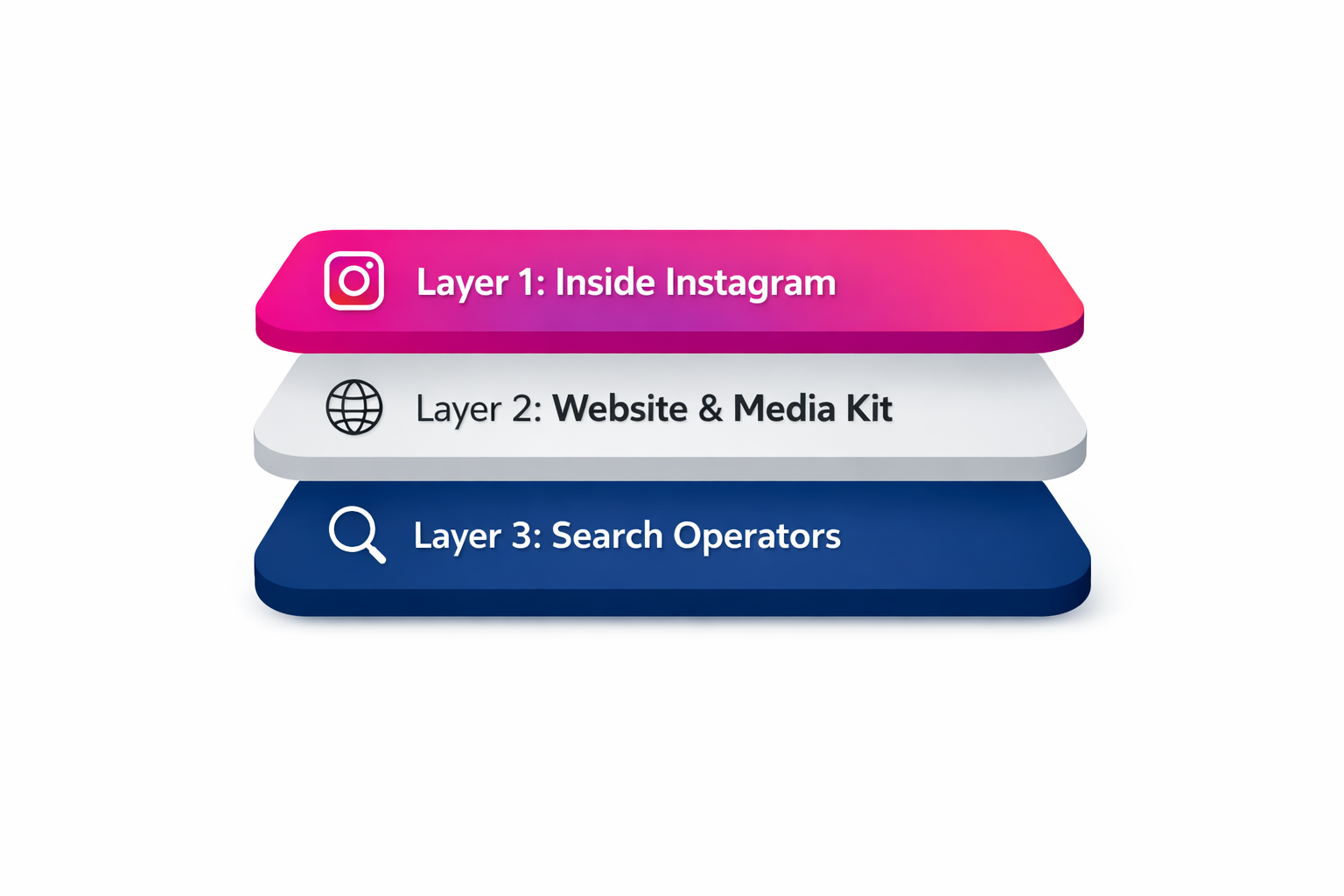
- Inside Instagram: Contact surfaces Instagram does intend to
- Outside Instagram: where businesses actually want to be contacted
- Search layer: intelligent queries to find public contact pages and media assets
At the end, you'll also get an Email Confidence Score to judge whether what you found is real - and what to do if there's no email at all.
Why the email went missing from the bio
Before you go on a hunt, it helps to find out why Instagram bios have become "email-less."
Spam became worse (and email text is easy to copy)
A plain text email in a bio is more or less a beacon for bots and spam lists. Many brands get rid of it after getting flooded.
Forms filter better than inboxes
A form allows them to route leads (sales/support/PR), capture context, and block spam (low effort).
Instagram provides contact surfaces in the platform
Professional accounts can have contact methods displayed as buttons (Email/Call/Directions/Action buttons), which are more tidy than an address typed in a bio.
Media kits replaced "public email"
Creators often have contact information in a press kit (Notion/PDF) and not in the bio where anyone can harvest the information.
Layer 1: Take a look inside Instagram (where people forget to check)
This is the highest signal/lowest effort layer.
The Contact button (in most cases more reliable than the bio)
On many professional accounts, the email isn't written out - it's behind a Contact or Email button towards the top of the profile. Contact/action buttons are specifically supported by Instagram for professional accounts.
What to do:
- Open the profile
- Look near the top. Look for Contact, Email, Call, Directions, or an action button
- Touch it, and see if it offers an email address
Why this matters:
If the email is here, it's almost always the "official" channel of contact that the owner wanted people to reach him or her through.
The Website field (not just "link in bio" vibes)
Even if email is hidden, it is most likely that there is a link to a website on most business profiles.
That link should be considered as a gateway to:
- contact page,
- footer email,
- press page,
- help desk,
- booking link.
Quick examine the site: open it and scroll down.
- footer
- Contact / About
- Press / Media / Partnerships
- Help / Support
Highlights and pinned posts: "Contact" can be easily buried here
Many businesses park contact details in:
- Highlights "Contact," "Press," "Collab," "Info," "Work with me"
- Pinned Posts Containing Collaboration Info
This works because it's:
- prominent for humans,
- easier to update,
- less harvestable than unadorned bio text.
Small profile information - which tells you where to look next
There are two quick cues that can save you time:
- Local service business (salon, clinic, cafe): often prefers Call/Directions buttons to email
- Ecommerce: is often pushing support portals or order/help pages instead of one inbox
- Creators: a lot of times route through management email or media kit
These clues explain what "outside Instagram" path is most likely.
Layer 2: Where businesses put their email (outside Instagram)
Here's the reality in 2026, even when businesses have an email, oftentimes they prefer that you find it on their site - not on Instagram.
The Contact Surface Map (do not random click but use this)
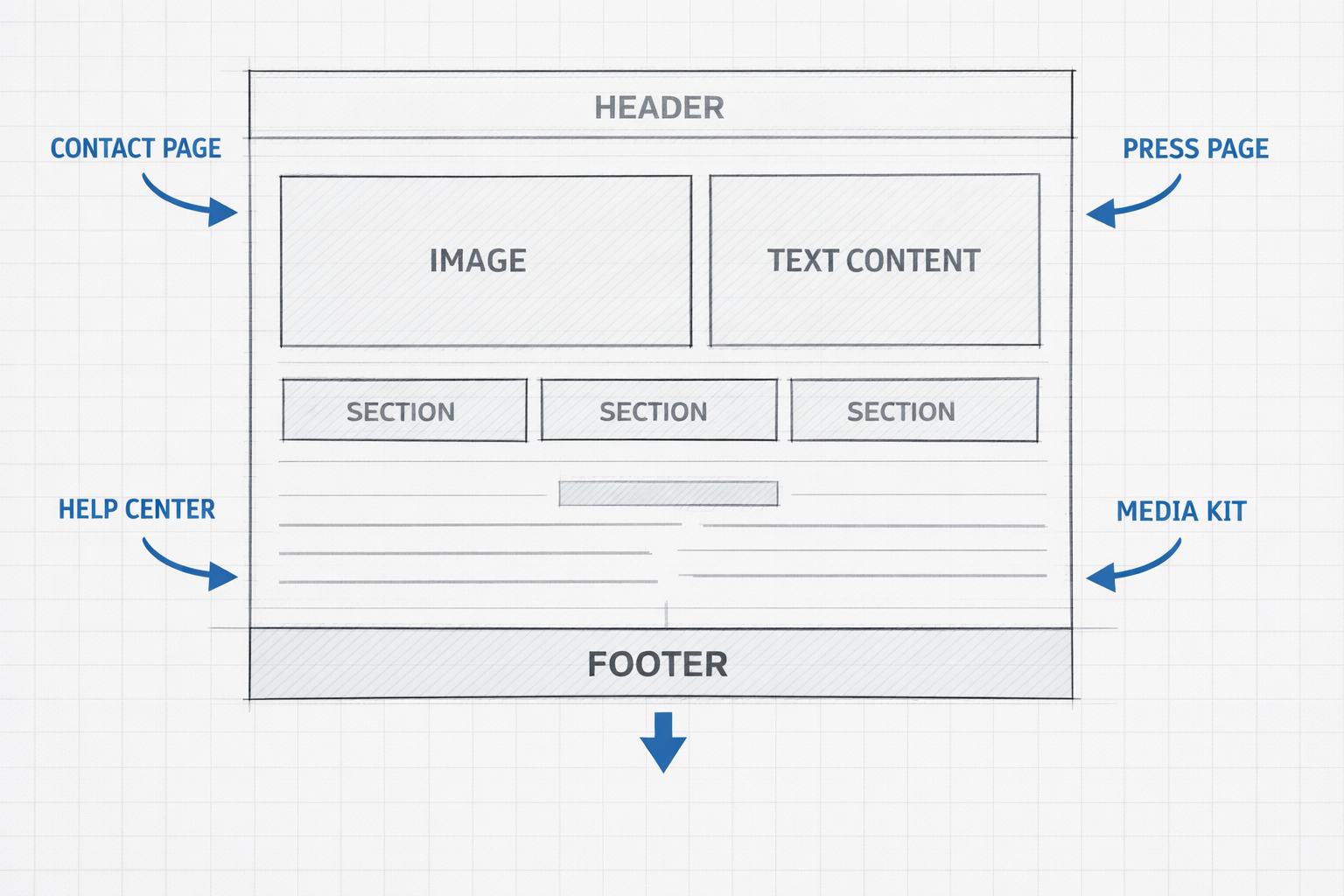
When you land on the website of a brand, inspect the following surfaces in the order:
A) The obvious (but don't stop here)
- /contact
- /about
- header navigation "Contact"
B) The places that are hidden in plain view
- Footer (especially on mobile)
- Privacy policy/Terms/Returns pages (support emails often live here)
- "Help Center" or "Support" sections
C) The business development takes place on the surface
- /press
- /media
- /partnerships
- /affiliate
- "Work with us"
- "Brand collaborations"
D) The creator / PR layer
- Media kit (Notion page, PDF, Google drive)
- "Press inquiries" section
- "Management" contact info
Pro tip: If you receive a form rather than an email, submit nothing yet - first scan for:
- confirmation text ("We will reply to you in 48 hours at___")
- auto-reply language that reveals some support address/domain format
Cross-platform confirmation (quick and legit)
If a brand is serious, they'll often have contact channels on at least 1 other profile:
- LinkedIn (company page, or founder profile)
- YouTube "About"
- TikTok business email / link
- Facebook Page (this is still common for local businesses)
The goal isn't to gather everything - it's to ensure that you've found the right entity.
Layer 3: Search smart (light OSINT, brand safe)
If Instagram + website browsing didn't turn up an email, then search engines often will - because contact pages get indexed.
Use these queries (change the brand name or the domain):
Best search operators
| Query | Purpose |
|---|---|
| "Brand Name" + contact | Find contact pages |
| "Brand Name" + press | Find media/PR pages |
| "Brand Name" + "media kit" | Find creator press kits |
| site:branddomain.com contact | Search within official domain |
| site:branddomain.com "@" | Find any email on the domain |
| site:branddomain.com press | Find press pages on domain |
How to avoid false positives
When brand names are widespread, then anchor to the domain whenever possible:
- favor results that have the official domain
- match location/category if need be (city + niche)
The Email Confidence Score (don't just "find"--verify)
Finding an email is easy. Finding the right email is what makes the difference for your outreach (and your sender reputation).
Use this confidence scale that is very easy:
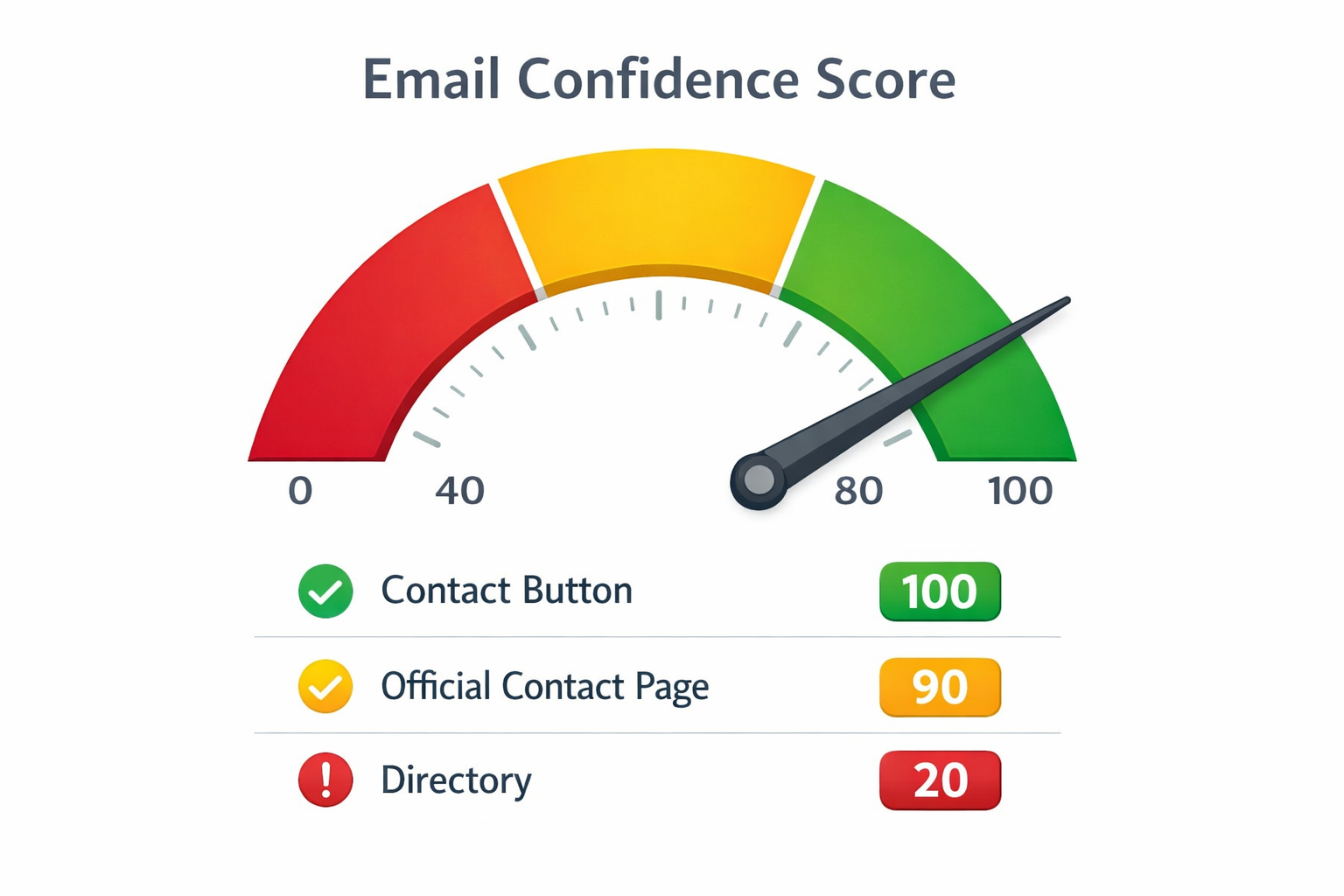
Confidence scoring (0-100)
| Score | Source |
|---|---|
| 100 | Instagram Email/Contact button revealed email |
| 90 | email located on official domain contact page of the brand |
| 80 | email in a page of the press / media kit matching the domain |
| 70 | email on other verified platform (YouTube/LinkedIn) + domain matches |
| 50 | role based guess (hello@ / info@) not confirmed anywhere |
| 20 | email from random directories with some weak or no domain association |
Rapid checking list
Before you outreach, validate:
- Domain match: does the email domain match the brand's website?
- Role vs person: Is it info@ (general) or specific person/team?
- Context match - is it "support" or "partnerships"?
- Deliverability - if you use an email verification tool: check syntax + domain/MX (don't email obvious dead addresses)
If there's NO Email: what to do instead (and still get replies)
Sometimes businesses even purposely eliminate email in order to compel structured contact.
Here are alternatives that in many cases are more effective than cold emailing:
Use DM - but do not make it annoying
A good business DM isn't a pitch dump. It's a routing request.
A practical 3-line structure:
- Who you are (1 line)
- Why you're reaching out (1 line)
- Ask the best channel (1 line)
Example (Customize, Don't Copy-paste Blindly):
Hi -- I'm [Name] from [Company]. We're looking at doing a partnership around [specific product/content angle]. What's the best email (or form) to communicate inquiries by email?
Use website form, but write like human
When a form is the preferred channel, Short + Specific beats Long + Generic
Use booking links (if they do exist)
If they have booking, they're trying to tell you: "We're not very fond of back-and-forth conversations in our inbox."
For B2B: Linkedin often beats Instagram
If the brand is selling to businesses, LinkedIn is often the "real" business channel.
A note about compliance and responsible data use
This is relevant in terms of E-E-A-T, this is relevant in terms of your risk.
Instagram's Terms of Use include prohibitions regarding access or collection of information in automated forms without permission.
Meta is also known to publish Automated Data Collection Terms and broader Terms of Service which limit the use of automated data collection without prior permission.
Instagram also points out that restrictions are possible through data scraping.
Practical takeaway:
Use this workflow to identify/collect public business contact info for legitimate outreach. Don't use it to spam people, and don't build automation that violates the rules of the platform or laws in the place where you are implementing it.
If you are going to email, then follow basic best practices:
- relevance-first outreach,
- clear identity,
- easy opt-out,
- reasonable follow-ups,
- respect local regulations (i.e. GDPR/CAN-SPAM depending on where you are operating)
What Scravio can do to help (without guessing)
If you're doing this at scale for legitimate sales/pr/partnerships, it's not "finding one email which is hard" - it's creating a list which is:
- structured,
- deduplicated,
- and easy to go over using a confidence process.
That's where a tool like Scravio's Instagram Email Scraper can fit into your workflow - especially if you use it in conjunction with:
- the Contact Surface Map (to find out official sources),
- and the Email Confidence Score (to prevent the junk data).
Scravio supports multiple extraction methods:
- Followers — Extract emails from competitor or niche audiences
- Hashtags — Find businesses posting under commercial hashtags
- Likers — Target users who engaged with specific content
- Commenters — Reach the highest-intent audience
(Keep it responsible: be focused on making contacts with your business publicly and don't be spammy in your outreach.)
Need to find Instagram business emails at scale? Scravio's Instagram Email Scraper extracts public emails from followers, hashtags, likers, and commenters — with built-in verification.
Try Scravio Free